At Queensmead, using technology is a key element of teaching and learning.
Both students and staff constantly engage with, and make use of, technological devices inside and outside of school. As a result, we want our students to be equipped with the knowledge and skills to keep themselves safe online.
This includes knowing how to safeguard against threats, such as viruses and hacking, and having an awareness of the dangers when using social media. We integrate our E-safety curriculum into our wider curriculum (as outlined below) and we also deliver regular E-safety sessions during assemblies, Form Time and Personal Development lessons.
This year, for the first time, we will be holding an E-Safety evening for parents on Monday 13th January. If you would like to attend then please complete the Google Form here.

E-Safety in the Computing Curriculum
Year 7
- Cyberbullying
- Viruses
- Scams
- Hacking
- Fake news
Year 8
- Keeping yourself safe online
- Online relationships, sexting and social media
- Mental health
- Hacking, encryption, malware/viruses, artificial intelligence (information processing and security)
- E-safety within networks
Year 9
- The internet of everything – information collection, processing/analysis and transfer
GCSE
- Law and ethics of technology
- Social engineering
- Hacking, malware, prevention and detection
- Artificial intelligence
A-Level (distributed across both years)
- Information collection and processing, privacy, law and ethics, social engineering, hacking, malware, prevention and detection, artificial intelligence
E-Safety in the Personal Development Curriculum
Year 7
- Cyberbullying
- Fake news/conspiracy theories
Year 8
- Responsible social media use
- Developing digital resilience
- Inappropriate messaging
Year 9
- Emotional well-being and the media
Year 10
- Impact of pornography
- Online Gambling
Year 11
- Living positively online
Year 12/13
- Online sexual harassment
How to ensure your child’s online safety at home
10 Top Tips
- Have open conversations about online safety with your children regularly. Encourage them to share their online experiences and concerns.
- Set up parental controls on your home internet and mobile devices to filter inappropriate content.
- Teach your children about the importance of privacy settings on social media platforms and how to use them effectively.
- Encourage your children to use strong, unique passwords for their online accounts and explain the risks of sharing passwords.
- Discuss the potential dangers of sharing personal information online, including addresses, phone numbers, and school details.
- Be aware of age restrictions on social media platforms and apps. Most require users to be at least 13 years old.
- Keep computers and devices in common areas of the home where you can monitor their use.
- Teach your children about the permanence of online posts and the potential long-term consequences of their digital footprint.
- Familiarise yourself with the apps and games your children use to better understand their online world.
- Encourage your children to take regular breaks from screens to protect their physical and mental health.
Helpful Links
Here are a few links to give you more information about E-Safety. Each link can give you further guidance about how to prevent issues but also how to manage issues if they arise.
You can also find parental guides below, with guidance regarding on use of different social media.
Report a safeguarding concern
If you would like to inform the school about a safeguarding concern you have, please complete the form

ThinkUKnow
Find out what’s good, what’s not, and what you can do about it. It can give information about how to deal with certain issues and resources to show different occurrences that may happen online.

CEOP
Child Exploitation and Online Protection (CEOP) Report issues that happen online with regards to Cyberbullying and other similar problems and get help with dealing with that.
Get Safe Online
Get Safe Online with free expert advice: information about protecting your electronic devices whilst protecting yourself and your children.

Safety Net Kids
Safety Net is a charity which helps children and young people how to feel safe and confident – for example, if you worry about things like bullying, friendship, and feeling safe at home.
Follow this link if you want someone to listen to these worries and find ways tohelp you to manage them.

Digizen
Digital citizenship isn’t just about recognizing and dealing with online hazards; it’s about building safe spaces and communities, understanding how to manage personal information and about being safe on the internet.
O2 / NSPCC
O2 and NSPCC have teamed up to inform parents about how their child can stay safe on the internet. It has articles on various issues that may arise, and also contact numbers to call for help.

NSPCC
Online Safety Tips from the NSPCC. Helpful advice and tools that can be used to help keep children safe whenever and wherever they go online.
A parent’s guide to…

A guide to Instagram: understand how it works, so you can ensure your child is using it appropriately.

Snapchat
A guide to Snapchat: understand how it works, so you can ensure your child is using it appropriately.

Facebook Parents Portal
Read Facebook Parents Portal to know the basics – how to sign up, find friends, post and share – and familiarise yourself with Facebook’s policies and tools, as well as some best practices. Review Facebook’s tips for having a successful conversation with your child about online safety.
Read the Parental Control Guide so you can find out which specific content you can restrict.

X (formerly Twitter)
A guide to X (formerly Twitter): understand how it works, so you can ensure your child is using it appropriately.

TikTok
A guide to TikTok: understand how it works, so you can ensure your child is using it appropriately.

Cyberbullying
A guide to cyberbullying.
Bullying is a serious, long-standing social problem that now occurs in digital spaces as well as physical ones. It isn’t just a youth problem and it isn’t more of a problem online than offline.
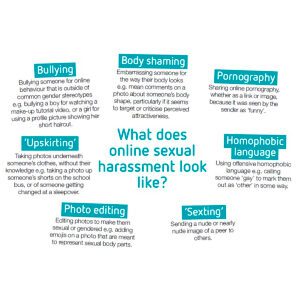
Online Sexual Harrassment
This guidance is based on the voices of young people giving adults their tips on how to tackle the subject of online sexual harassment.

Online Sexual Harassment Tips for Parents Poster
This poster offers a summary of top tips to parents in talking to their child about online sexual harassment